使用`Mavne Archetypes`定一个flink-udf-quickstart工具
定一个maven快速创建flink-udf工具 使用 Archetypes 定义一个flink-udf quick starter .
maven Archetypes 4.0
使用mvn archetype:create-from-project功能定一个flink udf 快速创建脚本工具
初始化模板 1 2 3 4 5 6 7 8 9 10 11 12 13 14 15 16 17 18 19 20 21 22 23 24 25 26 27 28 29 30 31 32 33 34 35 36 37 38 mkdir flink-udf-java-quickstart cd flink-udf-java-quickstart mkdir -p src/main/java mkdir -p src/main/resources mkdir -p src/test/java mkdir -p src/test/resources mkdir -p src/main/resources/archetype-resources mkdir -p src/main/resources/META-INF/maven/ # config archetype pom.xml bash -c 'cat > pom.xml << EOF <project xmlns="http://maven.apache.org/POM/4.0.0" xmlns:xsi="http://www.w3.org/2001/XMLSchema-instance" xsi:schemaLocation="http://maven.apache.org/POM/4.0.0 https://maven.apache.org/xsd/maven-4.0.0.xsd"> <modelVersion>4.0.0</modelVersion> <groupId>io.github.ordiy.flink.udf</groupId> <artifactId>flink-udf-java-quickstarter</artifactId> <version>1.0.1</version> <packaging>maven-archetype</packaging> <build> <extensions> <extension> <groupId>org.apache.maven.archetype</groupId> <artifactId>archetype-packaging</artifactId> <version>3.4.0</version> </extension> </extensions> </build> </project> EOF'
1 2 3 4 5 6 7 8 9 10 11 12 13 14 15 bash -c ' cat > src/main/resources/META-INF/maven/archetype-metadata.xml << EOF <archetype-descriptor xmlns="https://maven.apache.org/plugins/maven-archetype-plugin/archetype-descriptor/1.2.0" xmlns:xsi="http://www.w3.org/2001/XMLSchema-instance" xsi:schemaLocation="https://maven.apache.org/plugins/maven-archetype-plugin/archetype-descriptor/1.2.0 https://maven.apache.org/xsd/archetype-descriptor-1.2.0.xsd" name="flink-udf-java-quickstarter"> <fileSets> <fileSet filtered="true" packaged="true"> <directory>src/main/java</directory> </fileSet> <fileSet> <directory>src/test/java</directory> </fileSet> </fileSets> </archetype-descriptor> EOF'
定义 模板pom.xml vim src/main/resources/archetype-resources/pom.xml
贴入一下内容:
1 2 3 4 5 6 7 8 9 10 11 12 13 14 15 16 17 18 19 20 21 22 23 24 25 26 27 28 29 30 31 32 33 34 35 36 37 38 39 40 41 42 43 44 45 46 47 48 49 50 51 52 53 54 55 56 57 58 59 60 61 62 63 64 65 66 67 68 69 70 71 72 73 74 75 76 77 78 79 80 81 82 83 84 85 86 87 88 89 90 91 92 93 94 95 96 97 98 99 100 101 102 103 104 105 106 107 108 109 <?xml version="1.0" encoding="UTF-8" ?> <project xmlns ="http://maven.apache.org/POM/4.0.0" xmlns:xsi ="http://www.w3.org/2001/XMLSchema-instance" xsi:schemaLocation ="http://maven.apache.org/POM/4.0.0 http://maven.apache.org/xsd/maven-4.0.0.xsd" > <modelVersion > 4.0.0</modelVersion > <groupId > ${groupId}</groupId > <artifactId > ${artifactId}</artifactId > <version > ${version}</version > <packaging > jar</packaging > <name > ${artifactId}</name > <url > http://www.myorganization.org</url > <properties > <maven.compiler.source > 11</maven.compiler.source > <maven.compiler.target > 11</maven.compiler.target > <project.build.sourceEncoding > UTF-8</project.build.sourceEncoding > <scala.binary.version > 2.12</scala.binary.version > <flink.version > 1.17.2</flink.version > <flink.table.api.version > ${flink.version}</flink.table.api.version > <junit.version > 5.12.2</junit.version > <assertj.version > 3.27.3</assertj.version > <spotless.version > 2.44.4</spotless.version > <log4j.version > 2.24.3</log4j.version > </properties > <dependencyManagement > <dependencies > <dependency > <groupId > org.apache.flink</groupId > <artifactId > flink-table-api-java</artifactId > <version > ${flink.table.api.version}</version > <scope > provided</scope > </dependency > <dependency > <groupId > org.junit.jupiter</groupId > <artifactId > junit-jupiter</artifactId > <version > ${junit.version}</version > <scope > test</scope > </dependency > <dependency > <groupId > org.assertj</groupId > <artifactId > assertj-core</artifactId > <version > ${assertj.version}</version > <scope > test</scope > </dependency > <dependency > <groupId > org.apache.logging.log4j</groupId > <artifactId > log4j-core</artifactId > <version > ${log4j.version}</version > </dependency > </dependencies > </dependencyManagement > <dependencies > <dependency > <groupId > org.apache.flink</groupId > <artifactId > flink-table-api-java</artifactId > <scope > provided</scope > </dependency > </dependencies > <build > <plugins > <plugin > <groupId > org.apache.maven.plugins</groupId > <artifactId > maven-shade-plugin</artifactId > <version > 3.6.0</version > <configuration > <artifactSet > <includes > <include > *:*</include > </includes > </artifactSet > <filters > <filter > <artifact > *</artifact > <excludes > <exclude > META-INF/*.SF</exclude > <exclude > META-INF/*.DSA</exclude > <exclude > META-INF/*.RSA</exclude > </excludes > </filter > </filters > </configuration > <executions > <execution > <phase > package</phase > <goals > <goal > shade</goal > </goals > </execution > </executions > </plugin > </plugins > </build > </project >
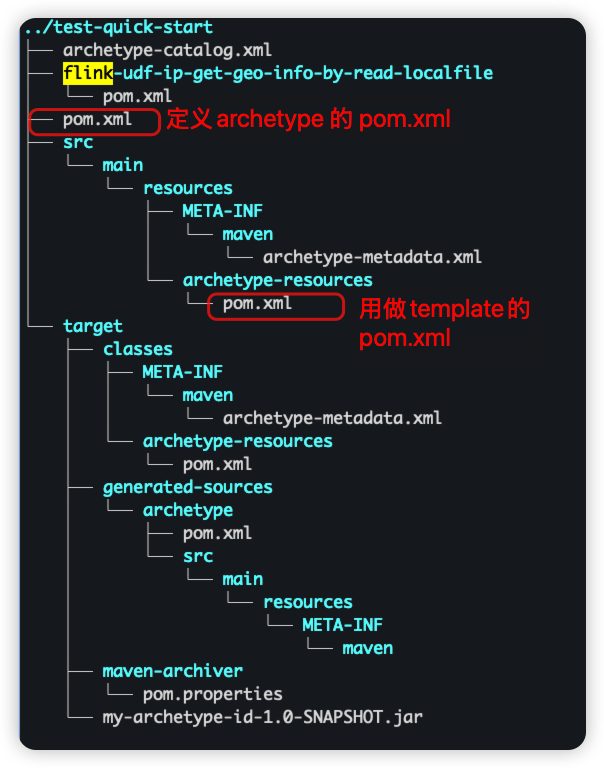
此时整个project 目录结构:
install to local maven repository 这一步很重要,如果不执行mvn archetype:generate -DarchetypeGroupId=io.github.ordiy.flink.udf 无法找到对应的project , 而导致failed.
使用
1
2
3
4
5
6
7
8
9
10
11
# 离开当前目录,创建新项目 cd ../ mvn archetype:generate \ -DarchetypeGroupId=io.github.ordiy.flink.udf \ -DarchetypeArtifactId=flink-udf-java-quickstarter \ -DarchetypeVersion=1.0.1 \ -DgroupId=com.qiliangjia.data.flink \ -DartifactId=flink-udf-ip-get-geo-info-by-read-localfile \ -Dversion=1.0.0-flink-1.17.2
deploy到私服
参照maven deploy 文档